← 눈나 자료실10/23 기준
말하는 AI 영상,
돈 내지 마세요.
사진 한 장이랑 목소리 하나면 돼요. 눈나 릴스도 이 순서 그대로 만들었어요.
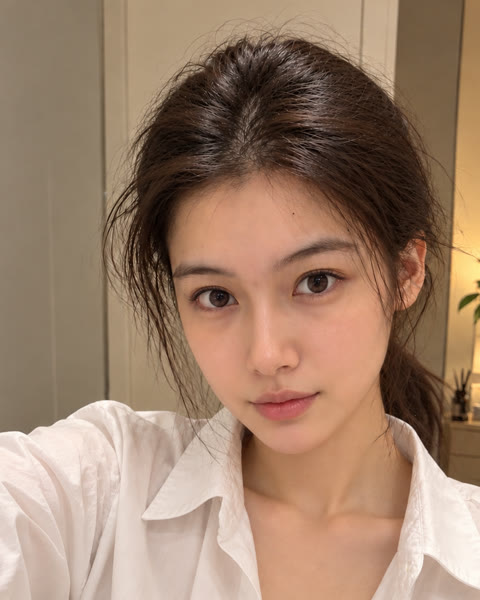 사진 1장
사진 1장→
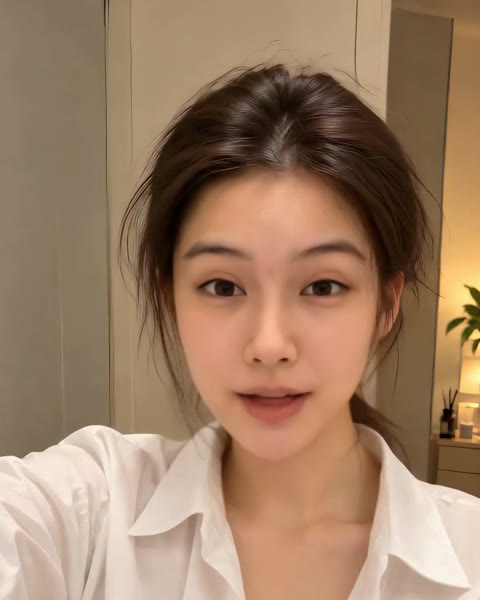 말하는 영상
준비물
| 사진 1장 | 얼굴이 크고 정면인 사진내 사진 · 허락받은 사진 · AI로 만든 사진만 |
| 목소리 파일 | 내 녹음 또는 TTS (mp3 · wav) |
| 허깅페이스 계정 | huggingface.co 무료 가입01 단계에만 필요 |
| 윈도우 PC | 엔비디아 그래픽카드 8GB 이상03·04 단계에만 필요 · 눈나는 RTX 3060 12GB |
01
허깅페이스 무료 웹(Wan 2.2)으로 사진 움직이기
- huggingface.co 무료 가입 → 로그인로그인하면 하루 무료 사용량이 늘어나요
- 아래 주소의 Wan 2.2 데모 열기
- Input Image에 사진 올리기
- Prompt에 02의 프롬프트 붙여 넣기 · Duration 5Advanced Settings → Inference Steps 4 (빠르고 사용량 아낌)
- Generate Video → 약 1분 → 영상 오른쪽 위 다운로드
데모 주소
https://huggingface.co/spaces/zerogpu-aoti/wan2-2-fp8da-aoti-faster
✓ 확인: 5초짜리 mp4(480×832, 16fps)가 받아지면 성공
무료 GPU는 하루 사용량이 정해져 있어요. 다 쓰면 "quota exceeded" → 다음 날 다시. 눈나 경험: 로그인한 무료 계정으로 하루 5초 영상 4개쯤.
02
'말하는 듯한' 영상 프롬프트
Prompt 칸 (통째로 바꾸기)
A young woman filming a selfie video at home, calmly talking to the camera as if explaining something to a friend, soft natural lip movements of speaking, small gentle head nods, natural blinking, subtle warm smile, relaxed face, hair moving slightly, steady handheld camera, realistic
Negative Prompt 칸 (원래 글 맨 끝에 덧붙이기)
, tongue out, wide open mouth, exaggerated expression, shouting, laughing, big teeth, face distortion, face morphing, identity change, different person, pointing finger, hand gestures
- 💡 가만히 있는 영상보다 '말하는 듯한' 영상이 좋아요입모양을 입혔을 때 눈썹·고개가 같이 움직여서 더빙 티가 덜 나요
- ✂️ 5초 중 앞부분이 얼굴이 가장 비슷해요뒤에서 얼굴이 조금 바뀌면 앞부분만 잘라 쓰기
- 🙂 표정이 과장되면 calm, subtle을 더 넣고 다시
03
레이턴트싱크(LatentSync 1.5) 설치
- uv(파이썬 관리 도구) 설치 → 새 PowerShell 창 열기
- 파이썬 3.10 · git · ffmpeg 설치
- 코드 받기
- 환경 만들고 라이브러리 설치10~20분 걸려요
- 모델 받기 (약 5GB)
① uv 설치 (끝나면 PowerShell 창을 새로 열기)
powershell -ExecutionPolicy ByPass -c "irm https://astral.sh/uv/install.ps1 | iex"
② 파이썬 · git · ffmpeg
uv python install 3.10
winget install Git.Git
winget install Gyan.FFmpeg
③~⑤ 코드 · 라이브러리 · 모델 (새 PowerShell 창에서)
git clone https://github.com/bytedance/LatentSync
cd LatentSync
uv venv -p 3.10 .venv
uv pip install -r requirements.txt --index-strategy unsafe-best-match
.venv\Scripts\huggingface-cli download ByteDance/LatentSync-1.5 whisper/tiny.pt --local-dir checkpoints
.venv\Scripts\huggingface-cli download ByteDance/LatentSync-1.5 latentsync_unet.pt --local-dir checkpoints
✓ 확인: checkpoints 폴더에 latentsync_unet.pt(약 5GB)와 whisper 폴더 안 tiny.pt가 있으면 성공
1.6 버전은 그래픽카드 메모리 18GB가 필요해요. 8~12GB면 1.5로.
04
목소리에 입모양 맞추기
- 01에서 받은 영상(talk.mp4)과 목소리(voice.mp3)를 LatentSync 폴더에 넣기
- 영상을 25fps로 바꾸기LatentSync는 25fps 영상을 받아요
- 목소리를 16kHz 모노 wav로 바꾸기
- 실행 → out.mp4
- 입이 목소리에 맞으면 성공
PowerShell (LatentSync 폴더에서)
ffmpeg -i talk.mp4 -an -vf fps=25 base.mp4
ffmpeg -i voice.mp3 -ac 1 -ar 16000 voice.wav
.venv\Scripts\python -m scripts.inference --unet_config_path configs/unet/stage2.yaml --inference_ckpt_path checkpoints/latentsync_unet.pt --inference_steps 20 --guidance_scale 1.5 --enable_deepcache --video_path base.mp4 --audio_path voice.wav --video_out_path out.mp4
목소리가 영상보다 길면 (앞→뒤로 이어 붙이기)
ffmpeg -i base.mp4 -filter_complex "[0:v]split[a][b];[b]reverse[r];[a][r]concat=n=2:v=1" -r 25 base_long.mp4
⏱ 눈나 컴퓨터(RTX 3060 12GB) 기준 3.6초 영상에 약 3분 20초
05
막힐 때
- insightface 설치 실패 ("Visual C++ 14.0 required")Microsoft C++ Build Tools에서 'C++를 사용한 데스크톱 개발'을 설치하고 다시 설치하기
- CUDA out of memory게임 등 다른 프로그램 끄기 · 영상을 3~5초씩 나눠서 돌리기
- 얼굴을 못 찾는다는 오류얼굴이 크고 정면인 영상으로 · 손이 얼굴을 가리지 않게
- 허깅페이스 "quota exceeded"오늘 사용량을 다 쓴 것 · 다음 날 다시, 또는 Duration을 3초로
꼭 지킬 것
- 🙅 실존 인물 사진은 본인 허락 없이 쓰지 않기
- 🏷️ 올릴 때 AI 레이블('AI 정보') 켜기
- 📄 라이선스 확인Wan 2.2 · LatentSync 코드는 Apache-2.0. 얼굴 검출에 쓰는 insightface 모델은 비상업 연구용 → 돈 버는 용도면 먼저 확인